Introduction
Creating a blog on Carrd can feel like a challenging task at first but once you understand the platform. It becomes one of the fastest ways to start sharing your ideas and building an online presence. Carrd is not a traditional blogging platform but it allows you to create visually clean content. Single-page blogs that are easy to manage and highly customizable. The flexibility of the platform, combined with its simplicity.
Makes it possible for entrepreneurs and solopreneurs to launch a blog quickly without needing advanced coding skills. When you start building a blog on Carrd, you are not limited by complicated systems or slow page builders. Instead, you can focus on crafting content that connects with your audience and testing different approaches. Layouts and ideas before committing to more complex solutions.
Understanding the Carrd Platform for Blogging
Before creating a blog, it is important to understand the capabilities of Carrd as a platform. Carrd is designed for one-page websites but its flexibility allows you to structure content in a way that mimics a blog. You can include sections for multiple posts by linking to separate pages or embedding content from external platforms.
The visual simplicity of Carrd means that readers focus on your content rather than. Then being distracted by heavy design elements or slow-loading features. When designing a blog on Carrd, it is also critical to consider. The user experience on mobile devices because most visitors will access your pages from phones or tablets.
Using Carrd Templates to Speed Up the Blog Creation Process
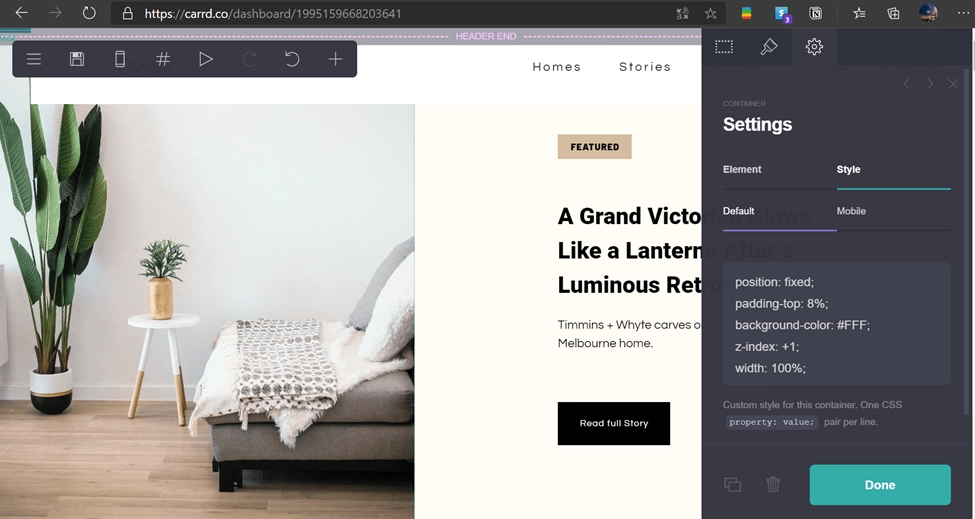
One of the most effective ways to start a blog on Carrd is by using professionally designed templates. Templates provide a strong starting point for your layout and visual style without limiting your creativity. When choosing a template, it is important to select one that allows flexibility in adding multiple sections.
· Templates save time with ready-made layouts.
· They keep your blog visually appealing on all devices.
· Embedding images and media is easy.
· Multiple sections can be added flexibly.
· Templates allow branding customization.
For posts and supports embedding images or multimedia content. Templates can also help ensure your blog is visually appealing on both desktop and mobile devices. While templates make it easier to launch a blog quickly.
Creating Separate Sections for Individual Blog Posts
Although Carrd is primarily a one-page platform, you can simulate a traditional one. Blog structure by creating separate sections or pages for each post. This approach allows each post to feel complete and organized while still keeping your main landing page concise.
For example, you can create a homepage that features summaries of your posts with buttons or links that lead to dedicated pages for full articles. Each section should have a clear headline, a brief introduction, a main content area and a call to action.
Embedding External Content and Integrating Multimedia
To enhance the value of your blog, it is often helpful to embed external content such as videos, podcasts or social media posts. Carrd supports embedding from multiple platforms, allowing you to enrich. Your posts with multimedia content support your written message.
For example, if you are writing a post about design tips. You could embed a short video tutorial or a slide deck to illustrate your points. Similarly, integrating images and screenshots directly into the sections helps. Explain concepts visually and break up large blocks of text, making the blog easier to read.

Collecting Feedback and Engaging with Readers
A key component of building a successful blog is engaging with your readers and collecting their feedback. Carrd allows you to include forms that can be used to gather emails, comments or survey responses. You can create simple sign-up forms for a newsletter or more detailed forms to understand your audience preferences.
Engaging with readers directly not only helps improve your blog content but also builds trust and loyalty. The feedback collected through these forms can guide future posts reveal popular topics and highlight areas. Where your audience wants more detailed insights.
Testing Different Layouts and Publishing Strategies
When creating a blog on Carrd, it is helpful to experiment with different layouts and publishing approaches. You can test longer in-depth posts versus shorter focused articles to see which resonates more with your audience.
· Test different post lengths to see what engages your audience most.
· Experiment with publishing frequency to find the optimal schedule.
· Adjust layouts and content organization without affecting the live site.
· Use analytics tools to track which sections and posts perform best.
· Continuously refine your blog to improve reader experience and engagement.
Similarly, you can experiment with publishing frequency and content organization to optimize reader engagement. Carrd makes it easy to make adjustments without affecting the original. The live site dramatically, allowing you to iterate and improve continuously.
Exploring Carrd’s Limitations and Workarounds
Carrd provides many advantages for quickly creating a blog. It is not a replacement for fully featured blogging platforms. You may encounter limitations such as the lack of built-in comment systems or complex content management features. However, understanding these limitations early allows you to plan effective workarounds.
For example, you can use third-party commenting tools or link to external platforms for long-form discussion. You can also manage multiple posts by creating. Separate pages and link them strategically to simulate a more traditional blog structure.

FAQ’s
1. Can I create a full blog on Carrd even though it is a one-page platform?
Yes, Carrd allows you to structure multiple sections or separate linked pages for individual posts, simulating a full blog layout effectively.
2. Do I need coding skills to start a blog on Carrd?
No, Carrd is a no-code platform, and you can create a visually appealing blog using templates and the drag-and-drop editor without any programming knowledge.
3. How can I add multimedia like videos and images to my Carrd blog?
Carrd supports embedding content from external platforms and uploading images directly, allowing you to enhance posts with visuals and interactive elements.
4. Can I collect reader feedback on my Carrd blog?
Yes, you can integrate forms to collect emails, survey responses, or comments, helping you understand your audience and improve content engagement.
5. What are the limitations of using Carrd for blogging?
Carrd lacks native comment systems and advanced content management features, but workarounds such as external commenting tools or linked pages can address these limitations.
Interactive Next Steps
If you are exploring how Carrd fits your blogging needs, it is helpful to browse professionally designed templates. They already implement effective layouts and engagement strategies. Exploring existing templates can inspire structuring. Your posts and organizing your sections while also giving insight into real-world use cases. If you are still unsure about how to start, you can experiment with creating a simple test page or a single post to experience.
How Carrd handles content, layout and reader engagement. You can explore these templates and see practical examples at Kostas Carrd Templates. This allows you to compare layouts, functionality and engagement approaches before finalizing your own blog design.