.png)
Can You Build a Multi-Page Website on Carrd?
Yes, but what that looks like in practice depends entirely on what you mean by "multi-page," and that distinction matters more than most people realize before they start building. Carrd offers more than one way to create the experience of moving between pages. Only one of those ways genuinely matters for SEO, though, and getting them confused early can cost you a lot of rework.
What most people imagine when they ask this question
The mental model is usually a traditional website: a homepage at yoursite.com, a separate about page at yoursite.com/about, a services page at yoursite.com/services. Each one loads independently and has its own URL. Each can surface on its own in search results.
That setup does exist in Carrd, but it's not the default behavior and it's not available on every plan, which is exactly where the confusion tends to start.
Section anchors: the scroll approach
Carrd's most basic navigation behavior works through section IDs and hash links. You give each section of your page an ID in the editor (something like "about" or "services"), and your navigation points to those IDs with a # prefix: #about, #services. When a visitor clicks, Carrd scrolls them smoothly to that section and the browser URL updates to reflect it, something like yoursite.carrd.co/#about.
To most visitors, this feels like landing somewhere new. The URL changed, the content changed, the nav item is highlighted. It behaves exactly like what they'd expect from a proper website. But from Google's perspective, it's still one document, and the platform doesn't treat yoursite.carrd.co/#about as a separate URL worth indexing on its own. All your content, across every section, is attributed to a single page.
For many use cases, that's completely fine. Just know the ceiling.
#Control elements: the section breaker approach
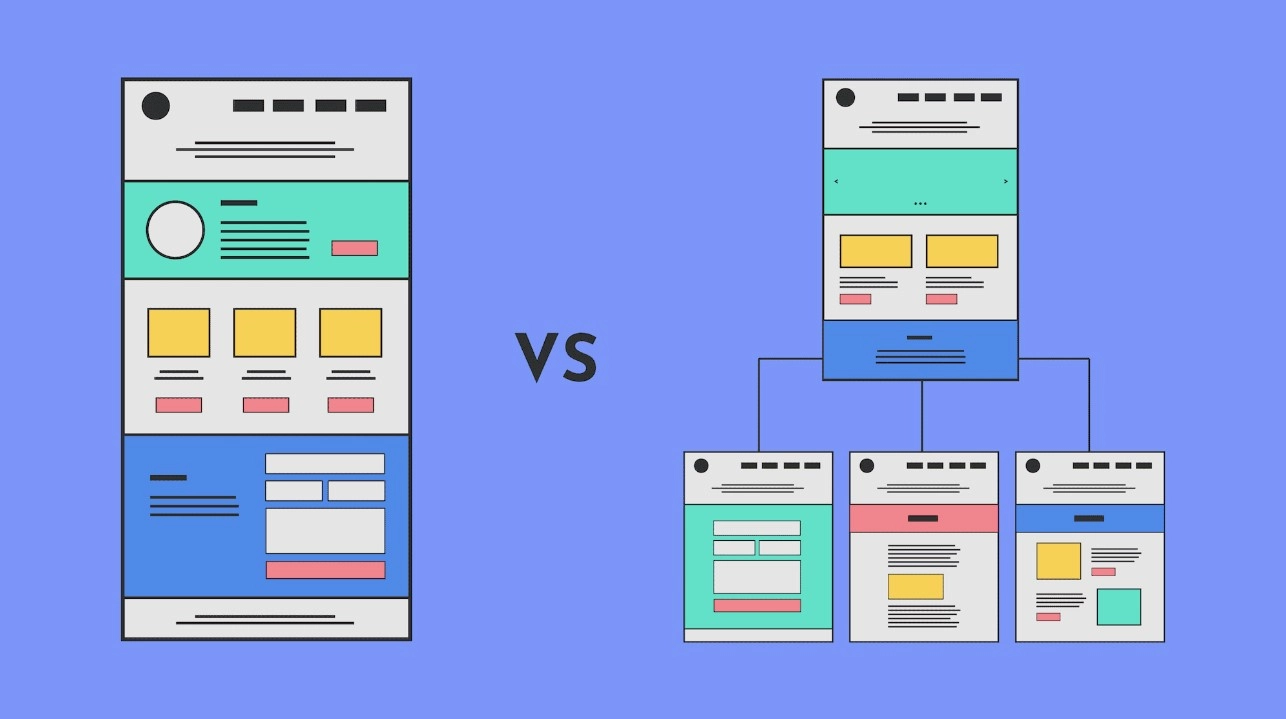
This is where things get more interesting visually, and where a lot of people get genuinely confused about what they're actually building. Carrd supports what are sometimes called control elements or section breakers, and they create a fundamentally different experience from smooth scrolling.
Instead of sliding the visitor down to the next section, these elements trigger a show/hide behavior. The current section disappears. The new one snaps into place cleanly, exactly like switching between pages on a conventional website. No scrolling, no vertical jumping, no visible transition.
From a design standpoint, this is compelling. Navigation feels neat and structured, and the layout behaves like a real multi-page site, which makes a Carrd build feel considerably more substantial and intentional, especially for portfolios or agency pages where first impressions carry weight.
The SEO reality doesn't change, though. Control elements are still operating inside a single-page HTML document, so the hash fragment in the URL (yoursite.carrd.co/#portfolio) is not treated by Google as a separate indexable entry point. There's still one page, one URL, and one set of meta tags covering everything, regardless of how many sections you've built.
That's not a flaw in the feature. For businesses that don't rely primarily on organic search, section breakers are arguably a better experience than full page reloads, since the navigation is faster, cleaner, and more polished. But if you walk into this setup expecting SEO-distinct pages, you'll hit a wall.
True multi-page Carrd: what actually matters for SEO
On Carrd's Pro Plus plan, you get access to genuine multi-page functionality, which is where things finally work the way most people originally imagined. In the editor, you create separate page objects, each with its own distinct path and its own content canvas. The result is a real site where yoursite.carrd.co/about and yoursite.carrd.co/services are separate URLs, each with its own meta title, meta description, and independently crawlable content.
This is the setup that matters if search visibility is part of your strategy. A homepage can target one set of keywords. A /services page targets a different intent. A /work page builds relevance for something else entirely. Google indexes each one as its own document and can surface them individually in results, which is exactly how multi-page SEO is supposed to work.
A few honest things to know before committing to this approach. The multi-page feature expands your canvas but doesn't change what Carrd fundamentally is. Each page is a static, hand-crafted layout with no CMS, no templating system, and no ability to auto-generate pages from a database. Every page gets built individually in the editor.
For a focused business site with five or six core pages, that's completely workable. For a site that needs to scale to dozens of pages with regularly updated content, it becomes a real constraint worth factoring in before you get too deep.
Each additional page also needs to be treated as a standalone document, with its own heading structure, its own meta tags, and its own clearly focused purpose, because a thin page with vague content doesn't help your SEO and it doesn't help your visitors either. The extra effort is real. But it also means every page on your site earns its place rather than padding out the count.
Choosing the right setup
Single-page scroll or section breakers make sense when you have one clear message, one primary offer, and organic search isn't your main acquisition channel. They're faster to build, easier to maintain, and more than capable for those situations. But still, you can replicate a multi-page setup on Carrd with no issues, just keep in mind the potential limitation can it comes to SEO (but that’s a thing to consider further down the road).
True multi-page is worth the additional work when different parts of your business need to be discoverable for different search terms, and when you're ready to treat each page as a real, intentional piece of content rather than a design exercise.
The carrd templates at onepagetips.com/#templates include examples of both approaches, and browsing a few real builds is often the fastest way to land on the right format for your situation. If you're still weighing the options, leave a question in the comments, because the right answer usually becomes clear pretty quickly once the specifics are on the table.